
There’s no Fish Road app to download from the App Store or Google Play, and that’s actually a good thing. The game runs directly in your mobile browser with no installation required, which means you skip the entire download-install-update cycle and jump straight into playing. Open your casino in Safari or Chrome, tap the game, and you’re in — same features, same RTP, same bonus mechanics as the desktop version, all accessible from your phone or tablet without eating up any storage space.
This browser-based approach is how most modern crash games and step-multiplier titles work, and it’s genuinely more convenient than a native app in almost every way that matters. You’re not stuck waiting for updates to download, you’re not dealing with app store approval delays when new features launch, and you’re not burning 100-200 MB of storage on a game that’s essentially just an interface for server-side calculations. The game loads in seconds, adapts automatically to your screen size, and runs smoothly on both iOS and Android devices without any compatibility headaches.
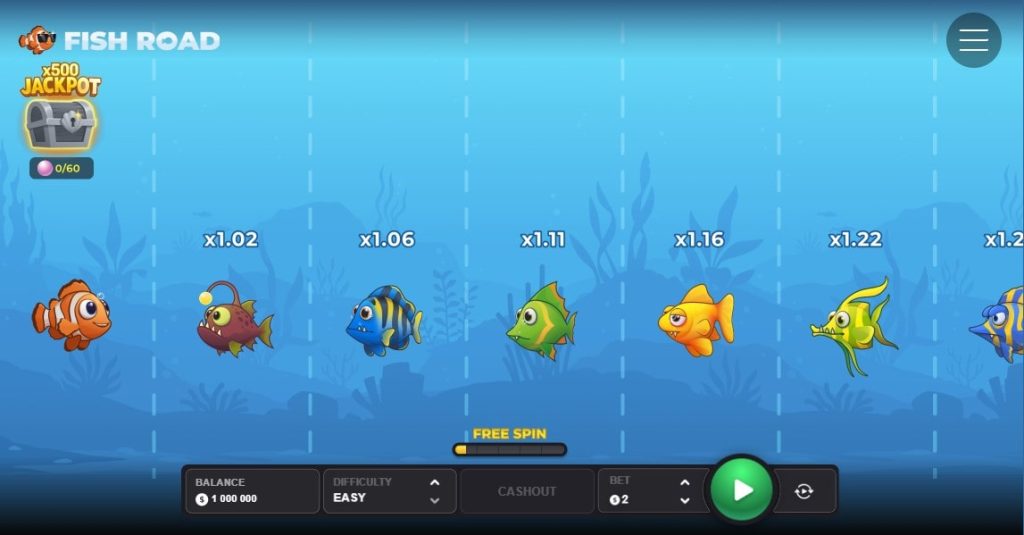
Everything available on desktop is fully functional on mobile. All four difficulty modes (Easy, Medium, Hard, Very Hard) work exactly the same way. The Free Spins and Jackpot meters progress identically. The Autoplay feature with preset cash-out points is active and just as useful for maintaining discipline on mobile as it is on desktop. The only real difference is the interface layout, which scales to fit a vertical screen naturally — and honestly, watching your fish swim forward on a portrait display feels more immersive than the landscape desktop view.
I’ve run dozens of sessions on both iPhone and Android devices, and the performance holds up consistently across both platforms. Chrome is my preferred browser on Android for the smoothest experience, while Safari works perfectly on iOS. Load times are fast, touch controls are responsive, and I haven’t encountered any lag or stuttering even during longer Autoplay sessions where the game is churning through rounds quickly. If you do most of your gaming on your phone, Fish Road app is built for that workflow rather than fighting against it.
Fish Road iOS
Playing Fish Road game on iOS devices is straightforward. Open Safari (or Chrome if you prefer, though Safari tends to perform slightly better with HTML5 games), navigate to your casino’s website, log into your account, and find Fish Road in the game lobby. Tap the game thumbnail and it loads directly in the browser window — no app installation prompt, no redirect to the App Store, just instant access to the full game.
The interface adapts automatically to your screen size, so whether you’re on an iPhone 15 Pro Max or an older iPhone SE, the layout scales appropriately. The multiplier display stays clearly visible at the top, the cash-out button sits right where your thumb naturally rests, and the difficulty selector and bet controls are positioned for easy one-handed operation. Everything feels deliberately designed for touch rather than just being a desktop game squeezed onto a smaller screen.
One useful feature: you can add Fish Road to your home screen for quicker access. While the game is open in Safari, tap the Share button (the square with an arrow pointing up), scroll down, and select “Add to Home Screen.” This creates an icon on your home screen that launches the game directly when tapped, giving you app-like convenience without actually installing anything. The icon uses the game’s logo, so it sits nicely alongside your other apps without looking out of place.
Fish Road Android
The Android experience is nearly identical to iOS. Open Chrome (recommended for best performance), navigate to your casino, log in, and tap Fish Road in the lobby. The game loads in the browser with full functionality — same features, same RTP, same responsive touch controls. The layout adapts to your device’s screen size automatically, whether you’re on a flagship Samsung Galaxy or a budget Xiaomi phone.
Chrome on Android also supports the “Add to Home Screen” feature. While the game is open, tap the three-dot menu in the top-right corner, select “Add to Home Screen,” and give it a name (or just keep it as “Fish Road”). The shortcut appears on your home screen and launches the game directly with one tap, bypassing the casino lobby entirely if you prefer.
Performance is solid across Android devices, though older phones (2019 models or earlier with less than 4GB RAM) might experience occasional frame drops if you have multiple browser tabs open simultaneously. Closing background apps before playing usually solves that issue. On newer devices, the game runs flawlessly even with other tabs active.

Fish Road Windows & Mac
While most people think of “app” as meaning mobile, Fish Road also works perfectly on Windows and Mac computers through any modern browser. Chrome, Firefox, Safari, and Edge all support the game without any plugins or extensions required. The desktop version gives you a larger screen for easier viewing of multiplier progression and more precise mouse control for timing your cash-outs, though honestly the mobile touch interface feels more natural for this type of game.
Fish Road app Mobile Features
Everything that works on desktop, is fully functional on mobile. Here’s what you get:
- Demo Mode. The free demo version is fully accessible on mobile with no registration required. Same URL as the desktop demo, same features, same unlimited virtual credits. Test strategies or practice on different difficulty modes without any financial risk, all from your phone.
- All Four Difficulty Modes. Easy, Medium, Hard, and Very Hard are all available on mobile with identical path lengths, multiplier progressions, and predator behaviors. Switch between modes freely before each round to adjust your risk level on the fly.
- Free Spins & Jackpot Meters. Both bonus features work exactly as they do on desktop. Every bet contributes to the Free Spins progress bar, and random pearls appear in shells to fill the Jackpot meter. Once triggered, the bonus games play out identically to the desktop experience — the only difference is tapping bubbles instead of clicking them.
- Autoplay with Preset Cash-Out. This is arguably even more useful on mobile than on desktop. Configure the number of rounds you want to play automatically and set a specific cash-out step, then let the game execute your strategy consistently without requiring manual taps. Perfect for grinding bonus meters during your commute or lunch break without needing to actively monitor every single round.
- Provably Fair Verification. The cryptographic verification system works on mobile browsers just as it does on desktop. You can check the fairness of any round by accessing the game’s provably fair interface, which displays the seed values and hash for independent verification.
- Portrait & Landscape Support. While portrait mode feels more natural for this game (watching your fish swim upward on a vertical screen just works better visually), Fish Road slot also supports landscape orientation if you prefer. The interface rotates automatically when you turn your device, though most players stick with portrait after trying both.
- Adjustable Bet Sizes. The full bet range ($0.01 to $150) is accessible on mobile. Use the + and – buttons or tap directly on the bet display to enter a specific amount. The interface is touch-optimized so you’re not fighting with tiny buttons designed for mouse cursors.
Mobile Performance & Requirements
What You Need
Fish Road isn’t demanding by modern mobile game standards. Here are the minimum requirements:
- iOS: iPhone 6s or newer, iPad Air 2 or newer, iOS 12 or later
- Android: Android 7.0 (Nougat) or newer, 2GB RAM minimum
- Browser: Safari (iOS), Chrome (Android), or any modern mobile browser with HTML5 support
- Internet: Stable connection required — WiFi recommended, 4G/5G works fine
The game doesn’t store data locally beyond standard browser cache, so storage space isn’t a concern. A typical session uses minimal data (under 5MB per hour), so you can play on mobile data without burning through your plan, though WiFi is always preferable for the most stable connection.
Performance Notes
Load times are fast across all devices — typically 3-5 seconds from tapping the game to being able to place your first bet. The game doesn’t preload assets in the background, so each session starts fresh without downloading updates or patches.
Touch response is immediate on both iOS and Android. The cash-out button registers taps instantly, which matters on Hard and Very Hard modes where timing is critical. I haven’t experienced any noticeable input lag even on older devices, though extremely budget Android phones (under $150) might show slight delays under heavy network load.
Battery drain is reasonable for an always-online game. An hour of active play typically consumes 8-12% battery on modern smartphones, which is on par with browsing social media or watching YouTube. Autoplay sessions drain slightly less since the screen doesn’t need to stay fully active between rounds.
Mobile vs Desktop — Key Differences
| Aspect | Mobile (iOS/Android) | Desktop (Browser) |
|---|---|---|
| Installation | None required — runs in browser | None required — runs in browser |
| Screen Size | Smaller but optimized for portrait | Larger, landscape orientation |
| Controls | Touch-based (tap to cash out) | Mouse/keyboard (click to cash out) |
| Performance | Smooth on modern devices (2020+) | Smooth on any device with modern browser |
| Features | All features identical | All features identical |
| RTP | 96% (same as desktop) | 96% (same as mobile) |
| Convenience | Play anywhere with phone + connection | Requires computer/laptop |
| Battery Usage | ~10% per hour active play | N/A (plugged in) |
The mobile experience isn’t a compromise — it’s the primary use case for most Fish Road casino game players. InOut Games clearly designed this with mobile-first thinking, and it shows in how naturally the interface works on a touchscreen.
Tips for Playing Fish Road app on Mobile
- Use WiFi when possible — While the game works fine on 4G/5G, a stable WiFi connection eliminates any risk of lag spikes during critical cash-out moments. Mobile data works in a pinch, but WiFi gives you the smoothest experience.
- Close background apps — If you’re on an older Android device or an iPhone with limited RAM, close unnecessary apps before playing. This frees up resources and keeps the game running smoothly even during longer sessions.
- Enable Do Not Disturb — Incoming calls, notifications, and text messages can interrupt gameplay and cause you to miss cash-out windows. Enable Do Not Disturb mode before starting a session to avoid distractions.
- Test touch sensitivity in demo mode first — Some screen protectors or thick phone cases can slightly reduce touch sensitivity. Run a few demo rounds to make sure the cash-out button responds instantly to your taps before playing with real money.
- Keep your screen clean — Fingerprints and smudges can make precise tapping harder, especially if you’re playing Hard or Very Hard modes where split-second timing matters. A quick wipe with a microfiber cloth before playing makes a difference.
- Use Autoplay for consistency — Tapping manually every single round gets tiring on mobile, and fatigue leads to mistakes. Configure Autoplay with a preset cash-out point and let the game execute your strategy automatically — it’s more reliable than trying to maintain perfect timing across 50+ manual rounds.
- Add to home screen for faster access — If you play frequently, adding the game to your home screen saves you from navigating through the casino lobby every time. One tap launches the game directly.
- Monitor battery and connection — Check your battery level before starting a session, and keep an eye on your connection strength. Running out of battery or losing connection mid-round counts as not cashing out, which means a lost bet.
Where to Play Fish Road on Mobile
Any casino that hosts Fish Road on desktop also supports mobile play — the game is browser-based, so there’s no separate mobile version to check for. Here are trusted casinos confirmed to work smoothly on both iOS and Android:
- BC.Game — Crypto-focused, mobile-optimized lobby, instant payouts
- Stake.com — Clean mobile interface, VIP rakeback, fast loading
- 1xBet — Dedicated mobile site, 10,000+ games, app available (optional)
- King Billy — Responsive design, MGA licensed, smooth on all devices
- Roobet — Mobile-first design, crypto payments, fast withdrawals
- Mystake — Mobile-optimized, crypto + fiat, works on all browsers
All of these platforms also offer the Fish Road demo on mobile, so you can test the game on your device before depositing.
Conclusion
The lack of a dedicated Fish Road app isn’t a limitation — it’s a feature. Browser-based play gives you instant access from any device without installation hassles, automatic updates without app store delays, and zero storage space consumed. The mobile experience is smooth, responsive, and fully featured, with performance that matches desktop across both iOS and Android devices.
Whether you’re grinding Easy mode on your lunch break, testing strategies in the demo while commuting, or going all-in on Very Hard mode from your couch, Fish Road works exactly the way you’d want it to on mobile. Add it to your home screen for one-tap access, enable Do Not Disturb to avoid interruptions, and use Autoplay to maintain consistency across longer sessions — and you’ll have a setup that’s genuinely more convenient than any native app could be.Just remember: mobile play is still real-money gambling. Set your budget before you start, stick to your stopping point, and never play with money you can’t afford to lose. The convenience of having Fish Road game in your pocket makes it easy to jump into a session anytime — which is great when you’re disciplined, but dangerous if you’re not. Play smart, and the mobile experience is genuinely excellent.
FAQ
Is there a Fish Road app for iPhone?
No. Fish Road doesn’t have a dedicated iOS app in the App Store. The game runs directly in your mobile browser (Safari or Chrome) with no download required. You can add it to your home screen for app-like convenience, but it’s browser-based rather than a native application.
Is there a Fish Road app for Android?
No. There’s no Fish Road app on Google Play. The game works in any modern Android browser (Chrome recommended), and you can add a home screen shortcut for quick access. Browser-based play is faster and more convenient than downloading an app anyway.
Can I play Fish Road on my phone?
Yes. Fish Road mobile works on both iOS and Android smartphones through your web browser. Open your casino’s mobile site, find the game in the lobby, and tap to play. All features work identically to the desktop version.
Does Fish Road work on iPad and Android tablets?
Yes. The game is fully compatible with both iPad and Android tablets. The larger screen makes it easier to see multiplier progression and gives you more room for the interface, though it’s optimized for phones as well.
Do I need to download anything to play Fish Road on mobile?
No. The game runs entirely in your browser with no download, installation, or app store visit required. Just navigate to your casino’s website and tap the game to start playing immediately.